Debian on Linksys NSLU2
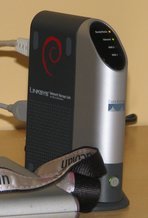
In the following, I will describe what is needed to get Debian running on your NSLU2. Please note that this page only provides information on running a full-blown Debian system on the NSLU2 on an external USB drive. If you're looking for a firmware to be put in the flash of the NSLU2 (such as Unslung or OpenSlug) or other information on this device, please go to the NSLU2-Linux project (in particular, check out the firmware matrix).
Finally, please note that the NSLU2 is a very low-end device by today's standards. In particular, the NSLU2 has only 32 MB of RAM, which is not much to run a modern operating system. The easy-to-use Debian installer is no longer available for the NSLU2 because the device does not have enough RAM.
Information
- An installation guide for Debian on the Linksys NSLU2.
- A set of Frequently Asked Questions (FAQ).
- Troubleshooting information with common problems and their solutions.
- Some tips and tricks about running Debian on the Linksys NSLU2.
- An image gallery with various pictures showing the internals of the NSLU2.
- An internals page listing the specs of the Linksys NSLU2.
- Some advances guides: cloning a NSLU2 and modifying a NSLU2 flash image. You can also find an explanation of the boot process of the NSLU2 running Debian.
External Resources
- The NSLU2-Linux project provides lots of information regarding Linux on the NSLU2.
- Peter Korsgaard's guide on manually installing Debian sarge. This is only of historical interest now that debian-installer supports the NSLU2.
Help
If you have problems with Debian on NSLU2 and cannot solve them with Google, there are the following resources you can consult:
- The debian-arm list for questions specifically related to the installation or operation of Debian on the NSLU2.
- The mailing lists of the NSLU2-Linux project for generic questions regarding Linux on NSLU2.
Acknowledgements
I'd like to thank the NSLU2-Linux
project for all their work on getting a modern version of Linux running
on this device and writing lots of documentation describing how this device
actually works. Without their work, getting Debian to run would have been
much harder. In particular, I'd like to thank Alessandro Zummo and John
Bowler for their kernel work and Rod Whitby for getting me excited about
the NSLU2 and answering all of the questions I asked while porting Debian
to this device. Gordon Farquharson has done lots of testing of Debian on
NSLU2. Joey Hess maintains the nslu2-utils package in Debian. Finally,
I'd like to thank the NSLU2-Linux
project again for donating a NSLU2 to me to help with Debian porting
efforts.